

Day 1 – Introduction to Computer
| Topic | Practical Activity |
|---|---|
| What is Computer? | Computer introduction |
| Uses of Computer | Real-life examples |
| Parts of Computer | Identify components |
| Input & Output Devices | Keyboard, Mouse, Monitor |
| Basic Knowledge | Computer kaise work karta hai |
What is a Computer and How Does It Work?
Welcome to Day 1 of our Computer Basics training series! If you have just started learning computers, this blog is the perfect starting point for you. Today’s article will start from absolute basics to help you understand what a computer is and what its main components are.
1. What is a Computer?
A computer is an electronic device (machine) that takes data or instructions as input, processes them, and then gives us an output (result).
A computer can perform large-scale calculations and tasks very quickly and without any errors.
2. Main Components of a Basic Computer
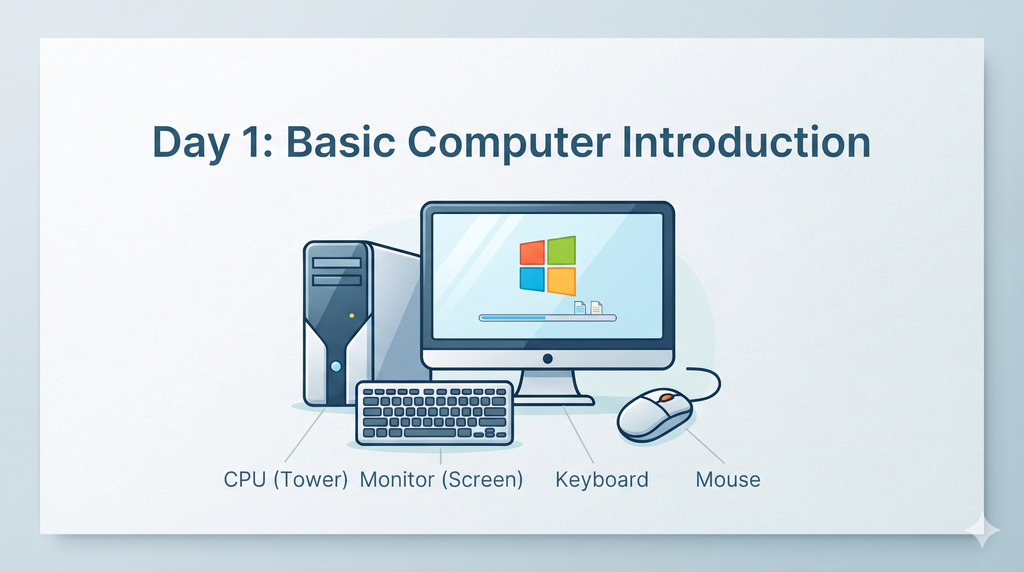
A standard desktop computer consists of 4 main parts:
I. CPU (Central Processing Unit – Tower/Cabinet)
- What it is: This is the Core Unit or the Brain of the computer.
- Function: It processes all data and houses main internal components like the motherboard, processor, and storage (HDD/SSD).
II. Monitor (Screen)
- What it is: This is an Output Device that displays everything on the screen.
- Function: It displays the visual information processed by the CPU, allowing you to see what you are working on.
III. Keyboard
- What it is: This is a primary Input Device.
- Function: It is used to type text, numbers, and commands into the computer system.
IV. Mouse
- What it is: This is also an Input Device.
- Function: It is used to control the on-screen cursor and interact with the system’s graphical user interface